
To disable delivery or freight options in an events page.
- Edit your events page, and click the SETUP tab top right, or the SETUP SHOPPING CART in the sidebar.
- From there CUSTOMISE DISPLAY OPTIONS found in the Display Options area.

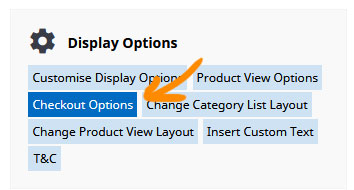
Find the DISPLAY OPTIONS section and select CHECKOUT OPTIONS to jump directly to the checkout settings.
Change the Checkout Address Process to CHECKOUT BUTTON ONLY.

Setting a Short Customer Address
To require a minimal set of customer address information, change the Checkout Address Format to SHORT CUSTOMER ADDRESS
