
You can adjust the size of your image thumbnails and thumbnail container sizing for shopping and other pages by clicking the OPTIONS tab when editing the page.
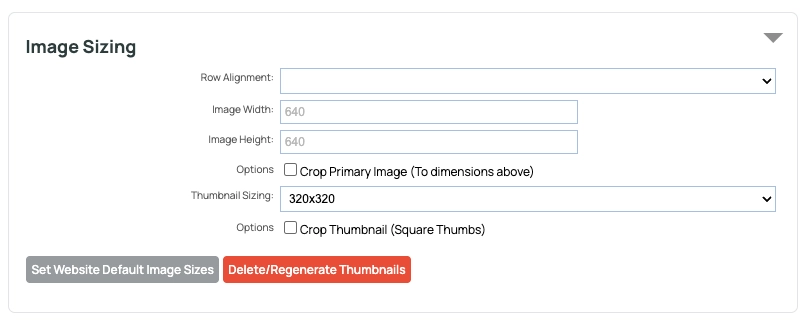
Settings Overview
| Row Alignment | Set how the page layout chooses to show the images and make different shapes and sizes consistent. |
| Image Width | Set the max-width in pixels for the uploaded full size image. |
| Image Height | Set the max-height in pixels for the uploaded full size image. |
| Crop Primary Image (To Dimensions Above) | Crop the uploaded full size image to the exact height and width specified. |
| Thumbnail Sizing | Choose the max-dimensions of the generated thumbnails. The default in is 320px by 320px. |
| Crop Thumbnail (Square Thumbs) | Crop the thumbnails to a square shape. |
| Set Website Default Image Sizes | Set the global image sizes for all system generated images. |
| Delete / Regenerate Thumbnails | Regenerate the system generated thumbnails for the page. |
Custom Thumbnail Sizes
Choose your thumbnail size from the THUMBNAIL SIZING dropdown. If you want consistent square thumbnails, check the CROP THUMBNAIL checkbox option.
Setting the Thumbnail Container size
Setting the ROW ALIGNMENT option allows you to choose how your images are laid out / spaced apart. Tall, Wide and Square images a presented in a tidy grid format based on the option chosen.
| Image Aspect Square Scaled | Show the images within a square container. Scale up small images to fit the container. |
| Image Aspect Portrait Scaled | Show the images within a tall container. Scale up small images to fit the container. |
| Image Heights Matched (Javascript) | Automatically adjusts the height of each row based on the largest thumbnail height (Non flex-grid layouts only) |
| Image Aspect Landscape Scaled | Show the images within a wide container. Scale up small images to fit the container. |
| Image Aspect Portrait Unscaled | Show the images within a tall container. Do not scale small images, leave as-is. |
| Image Aspect Landscape Unscaled | Show the images within a widecontainer. Do not scale small images, leave as-is. |
| Image Aspect Square Unscaled | Show the images within a square container. Do not scale small images, leave as-is. |