
CONTENT MANAGEMENT SYSTEM ONLINE HELP
  • The Basics
    • Getting Started
    • The Basics
    • Video Tutorials
    • Custom Form Basics
    • Domain Names
    • Website Hosting
    • Common Questions
  • Building your site
    • Adding Pages
      • Page Basics
      • 3rd Party Widgets
      • Menus and Sub menus
      • Other layouts
      • Uploading content
      • Photographers Shopping Cart
      • Events Booking System
    • Design Templates
      • The Basics
      • Changing the Banner
      • Tweaking your menus
      • Tweaking your template
      • Troubleshooting
      • Templates Advanced
    • The Content Editor
      • Editor Introduction
      • Formatting Text
      • Inserting content
      • Troubleshooting
      • Editor Advanced
    • Images / Photos
      • Finding Images
      • Editing Photos
      • Uploading Photos
      • Slideshows / Advanced Features
  • E-Commerce
    • Shopping Carts
      • Shopping Basics
      • Layout & Formatting
      • Payment
      • Pricing & Currencies
      • Stock & Quantities
      • Troubleshooting
      • VendHQ
      • Advanced
    • For Photographers
  • Email & Membership
    • Email Services
    • Scams and Hoaxes
    • Members / Bulk Emailer
      • Bulk Email
      • Forums & Blogs
      • Managing Membership
  • Promoting your site
    • Social Networks
    • Search Engines
  • Advanced
    • Embedding Web Fonts
    • Forms
    • API - EDI
    • Advanced
    • FAQ Help Map

>Getting Started >Email & Membership >Members / Bulk Emailer >Managing Membership >Allow admin access for single pages

Allow admin access for single pages

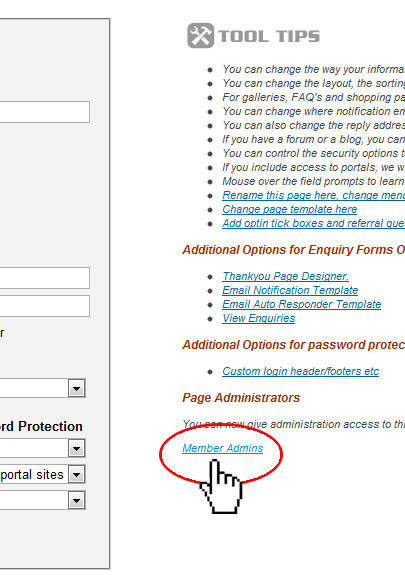
You can now assign admin access to individual pages to individual members.

You can do this by selecting the page you want to give admin rights to, select the "Options" tab in the top right and then select "Member Admins" at the bottom of Tool Tips", users will login via the website login (not CMS login) and they cannot upload photos/files.
[Index] [Previous]